Discord
Discord is a free voice and text chat program that’s designed for gamers. Due to many of its features, Alter Ego was designed specifically to use it via the discord.js API.
Features
Discord members congregate in servers. Servers may be publicly accessible or open only to members who are sent an invite link to that server. Further, text and voice chat can take place in different channels in a server. Within a server, different members may be granted specific permissions. These permissions can be given to specific roles or assigned to members on a channel by channel basis. Permissions exist to give members the ability do several different things, including:
- Create and delete channels.
- Grant and revoke permissions to specific members.
- Kick and ban members from the server.
- Change a member’s nickname within the server.
- See a channel on the channel list and read messages within it.
- Delete and pin messages within a channel.
- Read the message history of a channel.
- And many more.
In every channel, a member list is displayed on the right-hand side which displays all of the members that can read that channel. Members can be in a server without having a Discord account using the Discord browser app, however these members will cease to exist after they exit the app. With a Discord account, members can be in a server indefinitely, even when they’re offline.
Discord members can also direct message each other outside of a server. They can create group DMs as well.
Gameplay Implementation
This section lists how Discord is used to facilitate the game.
A game is contained in one and only one Discord server. It is run by Alter Ego.
Every Player is represented by a Discord server member, aside from NPCs. Each Player must have their own Discord account, unless they are an NPC. A single account cannot be used for multiple Players.
Every Room is represented by a Discord text channel. When a Player moves to a given Room, they will be granted permission to read that channel, and their permission to read the channel of the Room they were previously in will be revoked. This creates the effect of only being in one Room at a time. In a Room, a Player can see all of the other Players that are in the Room on the user list on the right side of the screen. Messages sent by a Player to a Room channel act as dialog from that Player, enabling communication between Players in a Room.
Every Whisper is also represented by a Discord text channel. When a Whisper
is created between two or more Players, a new channel will be created in the Whisper category, and only the Players in
the Whisper will be granted read access to that channel. When a Player leaves the Room or is otherwise removed from the
Room’s channel, their read access to all Whispers they were in will be revoked. Their name will also be removed from the
Whisper name, whose channel name will be edited accordingly. When all Players in a Whisper leave the Room, the Whisper
channel will either be archived or immediately deleted, depending on the
AUTO_DELETE_WHISPER_CHANNELS setting.
Every spectate channel also has a Discord text channel. When Player data is loaded from the spreadsheet, Alter Ego will check to see if that Player already has a spectate channel in the Spectate category. If not, it will create one with that Player’s name. It will not do this if there are already 50 spectate channels in the category.
When a Player enters a Room, inspects a Fixture or Room Item, or otherwise does something that requires text from the Spreadsheet be sent, Alter Ego will send the text to that Player via DM. Any Narration regarding a Player action will generally be sent to the channel of the Room that Player is in.
Displaying Content
Discord offers many ways to display content. Alter Ego makes use of several of these.
Markdown
Discord has its own implementation of Markdown. This allows users to style text in various ways. Alter Ego interacts with Discord Markdown in the following ways:
- When a Player sends a message to a Room channel as a Header of any size, Alter Ego considers this to be shouted dialog, and communicates it to neighboring Rooms.
- When a Player sends a message to a Room channel as Subtext, Alter Ego considers this to be quiet dialog, and will not communicate it to neighboring Rooms, even if it is in all uppercase letters.
Display Components
Discord has a variety of Display Components, which allow bots to send messages with highly customizable appearances.
Alter Ego has its own system of message display types. These are pre-defined sets of Display Components that can be sent by Alter Ego with ease. They are detailed here.
STANDARD
The STANDARD message display type is used in standard Narrations. It
consists of text inside of a Container Component.
The accent color used is set by the
STANDARD_MESSAGE_DISPLAY_ACCENT_COLOR setting.

WARNING
The WARNING message display type is used in Narrations meant to warn Players. It
consists of text inside of a Container Component. The accent color used is set by the
WARNING_MESSAGE_DISPLAY_ACCENT_COLOR setting.

ALERT
The ALERT message display type is used in Narrations meant to convey a sense of danger or urgency. It
consists of text inside of a Container Component. The accent color used is set by the
ALERT_MESSAGE_DISPLAY_ACCENT_COLOR setting.

MINOR
The MINOR message display type is used in Narrations meant to communicate information that isn’t important. It uses
Markdown, consisting of Subtext in a Block Quote. Messages sent with the MINOR message display type are sent with the
SUPPRESS_NOTIFICATIONS Flag,
so that they will not trigger a notification for users.

PLAIN_TEXT
The PLAIN_TEXT message display type is used to send a message as plain text, with no Display Components.

PLAYER
The PLAYER message display type is used to send Narrations on behalf of a Player. They are used when a Player performs
a Gesture or sends a Narration with the
narrate command.
It consists of a Webhook message
in which the username is the Player’s display name, and the
avatar is their current display icon or Discord avatar. The
content of the Narration consists of text inside of a Container Component. It uses the same accent color as a
message sent with the STANDARD message display type.

MONOLOG
The MONOLOG message display type is used to send Monologs on
behalf of a Player. It consists of a Webhook message that functions identically to the PLAYER message display type.
However, the Container Component does not have an accent color.

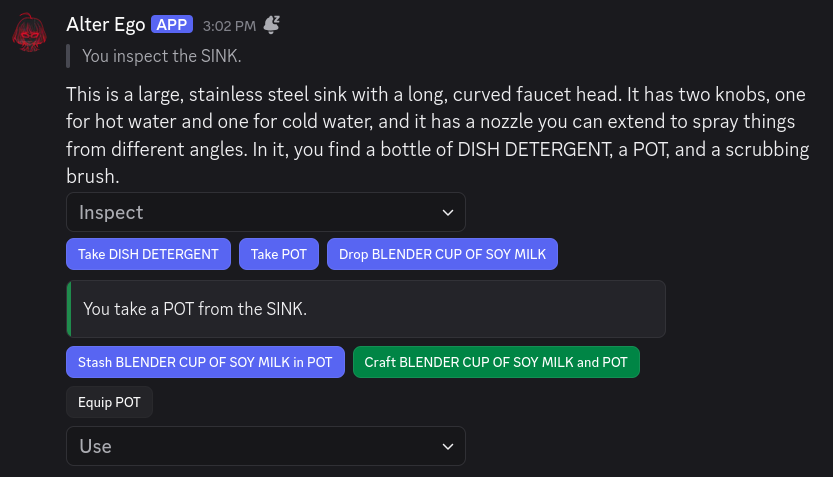
Interactive Components
Discord has several Interactive Components that Alter Ego uses to simplify many common tasks. The two main categories that Alter Ego uses are Action Rows and Modals.
For more information, see the article on Interactables.
Limitations
Discord servers have a number of limits. The following limitations are relevant to Alter Ego and the game:
- A server can have at most 500 channels - text, voice, and categories combined. Once 500 channels are reached, no
more channels can be created.
- Because each Room is represented by its own channel, and because there are 10 channels (including categories) minimum that Alter Ego requires outside of Room and Whisper channels, a single game can have at most about 440 Rooms. This number would consist of 8 categories for Rooms, each containing 50 channels, as well as a 9th category containing only 31 channels. This number does not account for spectate channels. Theoretically, a single game could have up to 491 Rooms, but only if Whispers are disabled, no Players have spectate channels, and the Whisper and Spectator categories are deleted.
- A channel category can have at most 50 channels - text and voice combined. Once 50 channels are reached, no more
channels can be created in the category.
- If a game has more than 50 Rooms, additional Room categories will have to be created.
- Message limit: 2,000 characters. Nitro users have a message limit of 4,000 characters. (note:
user/channel/role mentions and emojis contain more characters than are shown)
- If a description (without formatting characters) is longer than 2,000 characters, Alter Ego will not be able to send it to a Player.
- If a Player with Discord Nitro sends a message in a Room or Whisper channel that is longer than 2,000 characters, it will not be sent to spectate channels. Players should be discouraged from doing this.
- Username/nickname: 32 characters.
- A Player’s name must be 32 characters or fewer.
Discord also allows users to forward messages to almost any channel. Currently, Discord does not offer any way to restrict permission to do this, and these messages are considered to have no content of their own. As such, Alter Ego cannot handle these. Any forwarded messages sent to a Room channel, a Whisper channel, or the Announcements channel will be automatically deleted.
Another limit involves the Read Message History permission. When a member doesn’t have this permission (which is recommended for gameplay purposes), they will not be able to see messages sent any time they didn’t have permission to read a channel during their current Discord session. A Discord session can loosely be defined as the period of time starting when a member opens the Discord application and ending when they close it. This can mean different things depending on what version of the Discord application the user is using:
- On the Discord desktop app, a session ends when the user logs out, closes the app, refreshes the app, puts their computer into sleep mode, or turns off their computer.
- On the Discord browser app, a session ends when the user logs out, closes the tab, refreshes the page, closes their browser, or puts their computer into sleep mode.
- On the Discord mobile app, a session ends when the user logs out, closes the app, locks their device, or turns off their device. The session may also end when the user switches to a different app, though this depends on what operating system the device uses and how long the Discord app is inactive.
When a session ends, all messages that a user without the Read Message History permission was previously able to read will disappear when the user opens Discord again. For this reason, the Discord desktop app provides the best experience when playing the game because it most easily retains a session. The Discord browser app also works somewhat well for this purpose. However, using the Discord mobile app to play is severely not recommended. Unless the user keeps the app open constantly, never switches to another app, and never locks their device, a continuous session cannot be guaranteed, and thus the message history they have access to will clear very frequently. If you would like to see this issue resolved, upvote this thread in the Discord Feedback forums.
Known bugs
- Occasionally, when a Player moves to a new Room, the member list for that Room will appear blank. This can usually be fixed by the user opening a channel in a different category and then opening the Room channel again.
- Occasionally, when a Player leaves a Room, their read permission for all of the Whispers they were in will not be revoked. Additionally, the channel name may not be updated.