Room
A Room is a data structure used by Alter Ego. It represents a room that Players can move to.
Attributes
Despite being the basis of the game, Rooms have relatively few attributes. Note that if an attribute is internal, that means it only exists within the Room class. Internal attributes will be given in the “Class attribute” bullet point, preceded by their data type. If an attribute is external, it only exists on the spreadsheet. External attributes will be given in the “Spreadsheet label” bullet point.
Display Name
- Spreadsheet label: Room Display Name
- Class attribute: String
this.displayName
This is the name of the Room. This can contain any string of characters. This is how the Room will be referred to in most contexts. It will also appear in the heading component when the Room description is is sent to a Player.
ID
- Class attribute: String
this.id
This is an internal attribute which serves as the unique identifier of the Room. This is automatically generated from
the Room’s display name. It consists of the display name converted to all lowercase with special characters removed,
and all spaces converted to hyphens (-). This is to make it align as closely as possible with the characters that
are permitted in the names of Discord text channels. It should align perfectly with the
name of the Room’s corresponding channel, but as Discord does not have any documentation about exactly what characters
are permitted in the name of a text channel, this cannot be 100% guaranteed.
Internally, this is used as the actual ID of the Room. That is, when a Room is looked up, it is by ID, not display name.
Name
Warning
This attribute is deprecated and will be removed in a future release.
Use
this.idfor identification instead, orthis.displayNamefor display purposes.
- Class attribute: String
this.name
This internal attribute is a copy of the Room’s ID. It was how Rooms were identified prior to Alter Ego version 2.0. This attribute will be removed in the future.
Channel
- Class attribute: TextChannel
this.channel
This is an internal attribute. When the Room data is loaded, Alter Ego will attempt to find the channel whose name matches the ID of the Room. By making the channel a persistent internal attribute, Alter Ego can perform many operations more easily, such as adding a Player to the Room’s channel.
It should be noted that even if a Room’s channel is not part of a room category, Players will still be added to the channel when moving to its associated Room and Narrations will still be sent to the channel, but commands and dialog sent to that channel will not register as commands and dialog. When this occurs, Players and Moderators will be unable to issue commands in the channel, and Player dialog and Moderator Narrations will not be mirrored in spectate channels.
Tags
This is a comma-separated list of keywords or phrases assigned to a Room that allows that Room, and others with shared tags, to be affected by Events. There are no rules for how tags must be named, and there is no theoretical limit on the number of tags a single Room can have.
Some tags have predefined behavior. Here, each predefined tag will be listed, and its behavior will be detailed:
soundproof
- All dialog spoken inside the Room will not be narrated in adjacent Rooms, even if it is shouted or if Players in
adjacent Rooms have the
acute hearingbehavior attribute. - Players in the Room will not hear dialog from adjacent Rooms, regardless of the same circumstances.
audio surveilled
- All non-Whispered dialog sent to the Room will be narrated in all Rooms with the
audio monitoringtag with an indication of which Room the dialog originated in. - While there is no limit to how many Rooms can have this tag, applying it to too many could negatively affect Alter Ego’s performance.
audio monitoring
- All non-Whispered dialog sent to any Room with the
audio surveilledtag will be sent to the Room with an indication of which Room the dialog originated in.- Example:
[Break Room] Someone with a crisp voice says "Are you listening to me?"
- Example:
- All shouted dialog sent to Rooms adjacent to a Room with the
audio surveilledtag will be narrated in the Room with theaudio monitoringtag, as long as there is at least one Player in the Room with theaudio surveilledtag.- Example:
[Break Room] Someone in a nearby room with an obnoxious voice shouts "SOMEONE HELP!"
- Example:
video surveilled
- All Narrations sent to the Room will be narrated in all Rooms with the
video monitoringtag with an indication of which Room the Narration originated in. - While there is no limit to how many Rooms can have this tag, applying it to too many could negatively affect Alter Ego’s performance.
video monitoring
- All Narrations sent to any Room with the
video surveilledtag will be sent to the Room with an indication of which Room the Narration originated in.- Example:
[Break Room] Kyra begins inspecting the DESK.
- Example:
- If the Room also has the
audio monitoringtag, then all non-Whispered dialog spoken in any Room with thevideo surveilledandaudio surveilledtags will appear as a more natural dialog message, with the speaker’s display name and display icon alongside the display name of the Room the dialog originated in.
secret
- If the Room also has the
audio surveilledorvideo surveilledtag, then its name will be obscured when dialog and Narrations are transmitted to Rooms with theaudio monitoringorvideo monitoringtags.- Example:
[Intercom] Someone with a crisp voice says "Are you listening to me?" - Example:
[Surveillance feed] Kyra begins inspecting the DESK.
- Example:
Icon URL
- Spreadsheet label: Icon URL
- Class attribute: String
this.iconURL
This is an optional image URL that will accompany a Room’s description. The URL must end in
.jpg, .jpeg, .png, .gif, .webp, or .avif.
Exits
- Spreadsheet labels: Exit Name, Exit Phrase, Exit Tags, X, Y, Z, Unlocked?, Leads To Room, From Exit, Description When Entering From This Exit
- Class attribute: Collection<String, Exit>
this.exits
This is a collection of all of the Room’s Exits, where the key is the Exit’s name. All Rooms that can be accessed via a given Room’s Exits are considered adjacent to the given Room, meaning a Player can freely travel to them, as long as they are unlocked.
All columns on the Rooms sheet from Exit Name onward belong to Exits, rather than the Rooms themselves. For more information, see the article on Exits.
Exit
Warning
This attribute is deprecated and will be removed in a future release.
Use
this.exitsinstead.
This internal attribute was how Exits were stored prior to Alter Ego 2.0. Now, it is always an empty array. This attribute will be removed in the future.
Room Description
- Class attribute: Description
this.description
This internal attribute is the description of a Room. It will always be the description for the first Exit in the Room. When a Player enters from the first Exit or inspects the Room, they will receive a parsed version of this string. The Player will not be sent the Room’s description by itself. Instead, they will be sent a message comprised of Discord Components containing:
- The display name of the Room.
- The Room’s default description, or the description of the Exit they entered from.
- The Room’s occupants, excluding the Player themself.
- The description of the Room’s default drop Fixture. If the Room doesn’t have one, “There’s nothing of note about the [name of default drop Fixture].” will be sent instead.
- The Room’s icon URL. If the Room does not have one, then the default Room icon URL will be used instead. If no default Room icon URL is set, then Alter Ego will use the server icon instead. If the server icon is not set, then no image will be sent in the Room’s display name component.
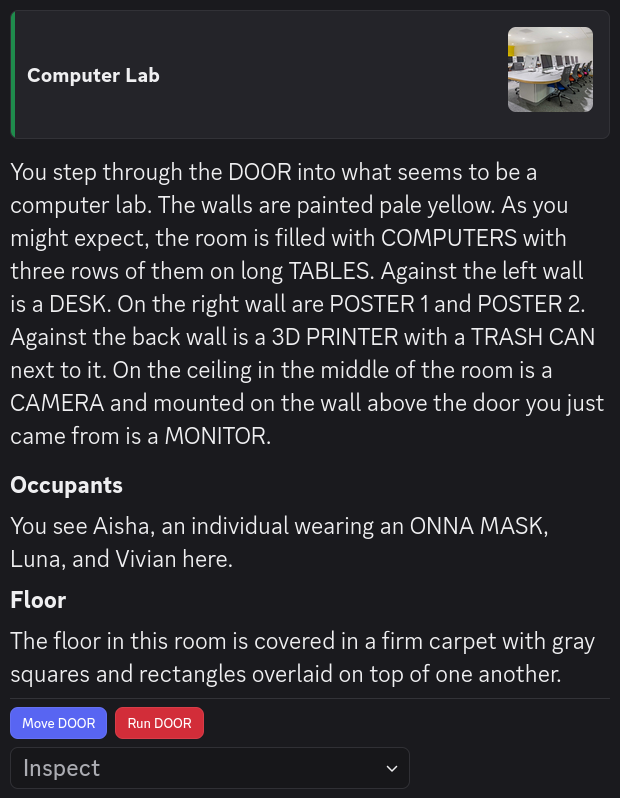
See the article on writing descriptions for more information. Note that because this uses its own custom set of Display Components, it is not possible to manually set the message display type for this Description.
Row
- Class attribute: Number
this.row
This is an internal attribute, but it can also be found on the spreadsheet. This is the row number of the first Exit in a Room. Alter Ego uses this data to determine which row of the Rooms spreadsheet contains the default description for a Room.
Occupants
This is an internal attribute. It is an array of all Players currently in the Room.
Occupants String
- Class attribute: String
this.occupantsString
This is an internal attribute. It is a string listing the display names of all of the Room’s
occupants in alphabetical order. However, any Players with the hidden behavior attribute
are omitted.
Methods
Rooms have a number of functions that can be useful to moderators. This is not an exhaustive list of publicly
accessible methods; only ones that are likely to be useful when writing Flag value scripts, or
if and var
tags in descriptions.
getChannelId
this.getChannelId();
- Purpose: Gets the ID of the channel associated with this room.
- Returns: String
- Parameters: None
generateOccupantsString
this.generateOccupantsString(list?);
- Purpose: Generates a string representing the occupants of the room, sorted alphabetically by display name.
- Returns: String
- Parameters:
generateOccupantsStringExcluding
this.generateOccupantsStringExcluding(player, list?);
- Purpose: Generates a string representing the occupants of the room excluding the given player, sorted alphabetically by display name.
- Returns: String
- Parameters:
getExit
this.getExit(name);
- Purpose: Gets the exit with the given name.
- Returns: Exit
- Parameters:
- String
name- The name of the exit to get.
- String
hasTag
this.hasTag(tag);
isAudioSurveilled
this.isAudioSurveilled();
- Purpose: Returns true if the room has the
audio surveilledtag. - Returns: Boolean
- Parameters: None
isVideoSurveilled
this.isVideoSurveilled();
- Purpose: Returns true if the room has the
video surveilledtag. - Returns: Boolean
- Parameters: None
isAudioMonitoring
this.isAudioMonitoring();
- Purpose: Returns true if the room has the
audio monitoringtag. - Returns: Boolean
- Parameters: None
isVideoMonitoring
this.isVideoMonitoring();
- Purpose: Returns true if the room has the
video monitoringtag. - Returns: Boolean
- Parameters: None
getContainedItems
this.getContainedItems();
containsNoItems
this.containsNoItems();
- Purpose: Returns true if this room contains no items.
- Returns: Boolean
- Parameters: None
containsItem
this.containsItem(identifier);
- Purpose: Returns true if this room contains an item with the given identifier or prefab ID.
- Returns: Boolean
- Parameters:
- String
identifier- The identifier or prefab ID to search for.
- String
getContainedItem
this.getContainedItem(identifier);