Interactables
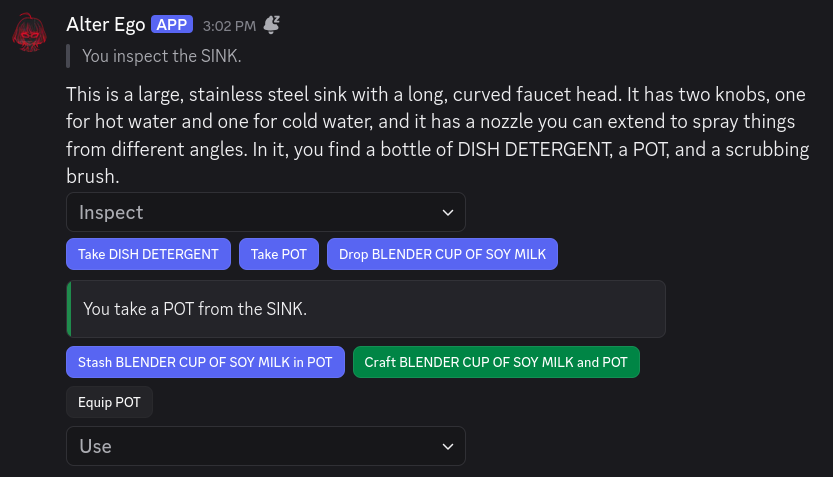
The primary way of interacting with Alter Ego is via commands. However, Interactables provide an alternative way of doing so that requires less input. Their main purpose is to provide shortcuts to many of the most commonly-performed Actions in Alter Ego.
Interactables make use of Discord’s Interactive Components: Action Rows. Alter Ego also has limited support for Modals.
This article will provide a general overview of what Interactables are, how they’re created, and how they’re used to facilitate gameplay.
Note
“Interactable” is a term referring to Alter Ego’s implementation of Discord’s Message Components that emit Interactions. The term “Interactable” is not used by Discord.
The Interactable Class
Under the hood, all Interactables derive from an abstract base class named Interactable. It has the following attributes:
Type
- Class attribute: Enum (number)
this.type
This is the type of Interactable being created. It can be one of the following:
BUTTONSTRING_SELECT_MENUSTRING_SELECT_MENU_OPTIONMODALTEXT_INPUT
Custom ID
- Class attribute: String
this.customId
This is an ID unique to the Interactable within a single message. Its purpose is to allow the
interaction handler to identify which Interactable was used, and to encode the information
it needs to execute the right behavior for the Interactable. For more information, see Discord’s documentation on the
custom_id field.
Priority
- Class attribute: Number
this.priority
This is a number which determines how high up an Interactable will appear in a list of Action Rows. The lower this value, the higher priority the Interactable has.
Respond With Modal
- Class attribute: Boolean
this.respondWithModal
This Boolean value indicates whether this Interactable will respond with a Modal Interactable when it is selected.
Action Directive
The Action Directive is the cornerstone of Alter Ego’s system of Interactables. It allows Discord’s Components to encode much more information than they were originally intended to, thus simplifying the process of performing Actions.
An Action Directive is constructed with a specific type of Action, a Player to perform it, and the arguments that will be needed to perform it.
After an Action Directive is constructed, its custom ID is generated by encoding its arguments, and the ID of the user it is being created for, in a hash function. This allows a unique custom ID to be generated for each Interactable that encodes all of the information required to perform an Action for a given user without exceeding Discord’s custom ID character limit of 100.
Once its custom ID has been generated, the Action Directive serves as a directive to perform an Action with those specific parameters, for that specific user.
Interactable Manager
Alter Ego has an Interactable Manager class that allows it to create and manage Interactables. An overview of how it works will be provided here.
Create Action Interactables Methods
The Interactable Manager has a number of public methods to create Interactables to perform Actions for a given Player and user. Which Actions have support for Interactables is detailed on the Action article.
All of these methods can generate multiple Interactables. Most of them can return either an array of Buttons or a String Select Menu based on how many Interactables were generated. For these methods, String Select Menus are typically the secondary choice, in case too many Interactables are to be generated, or if a more detailed description needs to be shown. However, some methods can only generate Buttons, and some can only generate String Select Menus.
Most of these public methods perform some validation to determine which Interactables to create. For example, if a Player’s held item is too large to fit in a given Inventory Slot, the method to create Stash Action Interactables will not generate an Interactable to stash that specific Inventory Item in that specific Inventory Slot. This built-in validation makes it relatively easy to insert Interactables in messages where they might be desired.
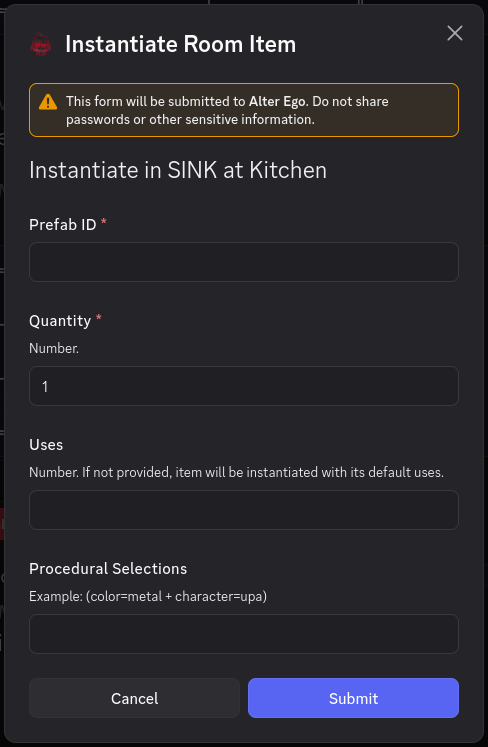
A small number of these methods can only generate a Modal—these are a last resort, in case it is impossible to perform an Action using only a Button or a String Select Menu, and they are only ever generated as a response to an Interaction with a different Interactable. Modals are reserved for open-ended Interactions where the user can enter any text they desire, like so:
When an Interactable is created, what’s really happening is that an Action Directive is created for the Action to be performed. The arguments required to perform the Action are converted into strings that can later be used to find the Game Entities needed to perform the Action, and an Action Directive is created with those arguments. Then, for each Action Directive that was created, an Interactable is created with that Action Directive’s custom ID and the Action Directive itself, and the array of all created Interactables is returned, so that they can be inserted into a message to be sent to the user.
The Interactable Cache
When an Interactable is created, it is added to the Interactable Manager’s Interactable cache. This is a Collection where the key is the Interactable’s custom ID, and the value is the Interactable itself.
The cache has a size limit of 500. If the size of the cache exceeds this limit, the oldest Interactable is removed to make space for the new one.
If an Interactable with the same custom ID as the one being added is already in the cache, it is deleted and replaced with the new one. Since Interactables can only have the same custom ID if they have the exact same arguments, no information is lost when this occurs; this effectively “refreshes” its lifetime, making it the most recently-added Interactable.
The Interactable Message Cache
In addition to a cache of Interactables, the Interactable Manager also has a cache of Interactable messages: messages which contain Interactable Components. This is also a Collection. When a message with Interactables is sent, the ID of the channel the message was sent to, as well as its message ID, are used as the key, and added to the message cache. The value of each entry is an array of the custom IDs of all Interactables in the message.
This cache has two limits. The first is that it can only contain up to 50 messages. If the size of the cache exceeds this limit, the message containing all of the Interactables is edited to remove its Action Row Components, the message is removed from the message cache, and the Interactables themselves are removed from the Interactable Cache. The second limit is that Interactable messages are valid for up to 5 minutes. If 5 minutes have passed since the message was added to the cache and it hasn’t already been removed due to exceeding its size limit, it will be removed the same way as if the size limit was exceeded.
When an Interactable message is removed from the cache, it is no longer possible to use any of the Interactables that were sent with the message. Even if Interactables with the same custom IDs still exist in the Interactable cache, they must be attached to a different message. The message that was originally added to the cache no longer has any Interactables to interact with.
Interaction Handler
In addition to the Interactable Manager, Alter Ego also has an Interaction Handler class that allows it to respond to Interaction events.
The only Interactions Alter Ego is programmed to respond to are when a user presses a Button, selects an option from a String Select Menu, or presses the Submit button in a Modal. When one of these events occur, the Interaction Handler retrieves the user who performed the Interaction. If the user isn’t a known Moderator or Player, it ignores the Interaction. If the user is valid, it retrieves the custom ID of the Interaction, and then processes it.
First, the Interaction Handler gets the Interactable corresponding with the custom ID from the Interactable Manager’s Interactable cache. If no such Interactable is found, Alter Ego replies to the Interaction with an error message.
If an Interactable is found, and it has an Action Directive, the corresponding Action is created with the Action
Directive’s Player, their location, and the user of the Interaction. If the user
is a Moderator, the Action is considered to have been forced. Note that an Action
born from an Action Directive will always have an undefined message.
After the Action has been created, the Interaction Handler calls the Action’s parse and validate Interaction arguments functions. The purpose of these functions is to take the arguments of the Action Directive and reconstruct the arguments needed to call the Action’s perform function. How these arguments are parsed and validated depends on the Action being performed, but in general:
- Parsing the arguments means that the string arguments of the Action Directive are used to find any Game Entities that are needed to perform the Action with the Game Entity Finder.
- Validating the arguments means ensuring that the Game Entities that were found still actually exist and can be interacted with, and that the Player can actually perform the Action—the state of the game may have changed significantly between when the Interactables were created and when the Interaction occurred, so the Player may not be able to perform it anymore.
If the arguments cannot successfully be parsed, or the parsed arguments are invalid, Alter Ego will reply to the Interaction with an error message, and no Action will be performed.
However, if the Action Directive’s arguments were successfully parsed and validated, the validate function will always return the arguments needed to call the perform function for the given Action. When this occurs, the Action is performed with these arguments, and the Interaction is considered complete. If the Action has a success message, Alter Ego will reply to the Interaction with it.